This documentation is available as Markdown for AI agents and LLMs. See the full Markdown index or append .md to any documentation URL.
EAS 观察简介
EAS Observe 是一项性能监控服务,可跟踪你的应用在真实设备和各种条件下的生产环境中的表现。
信息 EAS Observe 在免费计划中每月包含 100,000 个事件,在付费计划中包含 500,000 个事件,大约对应每月 10,000 和 50,000 的活跃用户。超出部分则按使用量计费。详情请参见 定价。
EAS Observe 是 Expo 提供的一项性能监控服务,用于跟踪你的应用在生产环境中的表现。它让你能够了解在不同设备、网络和条件下的真实启动时间、渲染性能和用户体验。
在 React Native 中,调试性能传统上仅限于开发工具。EAS Observe 关注于生产环境,在那里性能特性与开发过程中看到的有显著不同。
🌐 Debugging performance in React Native has traditionally been limited to development tools. EAS Observe focuses on production, where performance characteristics differ significantly from what you see during development.
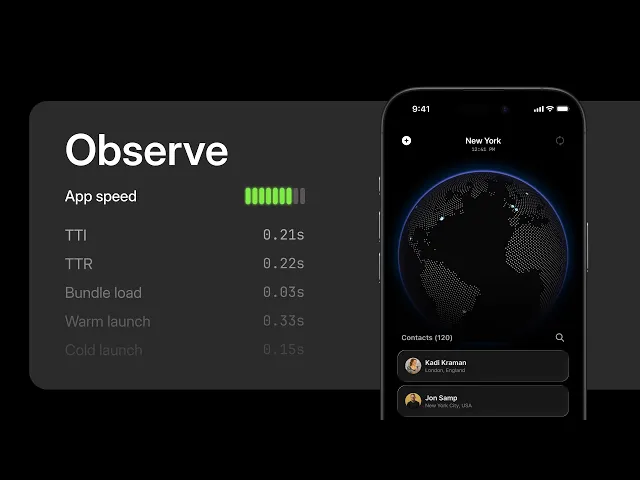
查看 EAS Observe 如何从你的生产应用中,在不同设备、网络和条件下揭示真实世界的启动和渲染性能。
快速开始
🌐 Quick start
用 ObserveRoot 组件(在 SDK 55 上用 AppMetricsRoot 组件)封装你的根布局,并在应用准备好接受用户输入时调用 markInteractive()。完整的设置指南请参见 入门。
🌐 Wrap your root layout with the ObserveRoot component (or the AppMetricsRoot component on SDK 55) and call markInteractive() when your app is ready for user input. See Get started for the full setup guide.
AI代理的 Expo 技能
🌐 Expo Skills for AI agents
如果你使用 AI 代理,安装 Expo Skills 来教它如何设置 expo-observe 并查询你的应用性能指标:
🌐 If you use an AI agent, install Expo Skills to teach it how to set up expo-observe and query your app's performance metrics:
Set up expo-observe, query metrics with the EAS CLI, and interpret startup and navigation performance data.
为什么观察EAS
🌐 Why EAS Observe
传统的开发时性能分析工具显示你的应用在你的机器上的表现。EAS Observe 显示它在真实用户中的表现:
🌐 Traditional development-time profiling tools show how your app performs on your machine. EAS Observe shows how it performs for real users:
- 生产性能数据:跟踪来自各种设备的真实用户会话中的启动时间、渲染性能、包加载时间和 EAS 更新下载时间
- 版本比较:查看应用版本和 OTA 更新之间指标的变化,以便及早发现回归问题
- 每条路由的导航指标:使用 Expo Router 或 React Navigation 集成,比较各路由的渲染和交互时间
- 会话调查:深入分析单个用户会话,以了解为什么某些设备或条件导致性能较慢
- 用户自定义事件:使用
Observe.logEvent记录你应用中的自定义信号,并将其与性能数据一起分析 - 错误报告(预览中):记录 JavaScript 错误和原生崩溃,并在仪表板中调查它们的堆栈跟踪
- CLI 和仪表板访问:通过
eas observe:命令在终端查询指标,或在 EAS 仪表板中查看它们
何时使用 EAS Observe
🌐 When to use EAS Observe
开发时分析和调试:使用 React Native DevTools 进行调试,使用 Expo Atlas 进行包检查。
JavaScript 错误:在 SDK 57 及更高版本中,EAS Observe 会记录 JavaScript 错误,并在仪表板上显示带符号化堆栈跟踪的信息。此功能处于预览阶段。有关设置和当前限制,请参阅错误报告。
原生崩溃:在 SDK 57 以及 expo-observe 57.0.21 及更高版本中,EAS Observe 会记录 Android 和 iOS 上的原生崩溃,并将它们与 JavaScript 错误一起在仪表板中显示。仪表板上的原生堆栈跟踪未符号化。详细信息请参见 错误报告 。
常见问题
🌐 Frequently asked questions (FAQ)
EAS Observe 跟踪哪些指标?
EAS Observe 会追踪启动指标(冷启动时间、热启动时间、首次渲染时间、可交互时间以及包加载时间)和 EAS Update 下载时间。在 SDK 56 及更高版本中,导航集成 会增加每个路由的渲染和交互时间。详细的每个指标说明请参见 指标参考。你也可以将自己的信号记录为 用户自定义事件,并记录 JavaScript 错误和原生崩溃(预览中)。
🌐 EAS Observe tracks startup metrics (cold launch time, warm launch time, time to first render, time to interactive, and bundle load time) and EAS Update download time. On SDK 56 and later, the navigation integrations add per-route render and interactive timings. See the Metrics reference for detailed descriptions of each metric. You can also log your own signals as user-defined events and record JavaScript errors and native crashes (in preview).
支持哪些平台?
EAS Observe 支持 Android、iOS 和 tvOS。指标来自生产版本,并且在仪表盘和命令行中都可以按平台进行筛选。
🌐 EAS Observe supports Android, iOS, and tvOS. Metrics are collected from production builds and can be filtered by platform in both the dashboard and CLI.
EAS Observe 在 Expo Go 中可用吗?
不。EAS Observe 依赖于 expo-observe 原生库,而 Expo Go 并未包含该库。要使用它,请创建一个 开发构建 或生产构建。
🌐 No. EAS Observe relies on the expo-observe native library, which is not included in Expo Go. To use it, create a development build or a production build.
EAS Observe 是否收集可识别个人身份的信息?
不。用户通过每次应用安装唯一的匿名 ID 进行识别。该 ID 不属于个人可识别信息,如果用户卸载并重新安装应用,该 ID 会被重置。更多详情请参见 Metrics reference: User。
🌐 No. Users are identified by an anonymous ID that is unique per app installation. This ID is not personally identifiable and is reset if the user uninstalls and reinstalls the app. See Metrics reference: User for more details.
当设备离线时会发生什么?
离线收集的指标会存储在设备本地。当应用进入后台且有可用连接时,它们会自动发送。你也可以使用 dispatchEvents() 手动刷新事件。
🌐 Metrics collected while offline are stored locally on the device. They are automatically dispatched when the app moves to the background and connectivity is available. You can also flush events manually using dispatchEvents().
我可以在开发过程中测试指标吗?
默认情况下,从调试版本收集的指标不会被发送。你仍然可以通过在 configure() 中将 dispatchInDebug 设置为 true 来进行测试发送。详情请查看 配置。
🌐 By default, metrics collected from debug builds are not dispatched. You can dispatch them anyway for testing by setting dispatchInDebug to true via configure(). See Configuration for details.
开始使用
🌐 Get started
安装该库并开始从你的生产应用收集指标。
查看指标,按平台或版本筛选,并调查单个会话。
从你的应用记录命名事件,并在仪表板上查看或通过命令行查询它们。
在仪表板中记录 JavaScript 错误并查看符号化的堆栈跟踪。
控制环境、调度和开发模式设置。
每个指标、概念和数据处理的详细描述。
expo-observe 库 API 的完整参考。