This documentation is available as Markdown for AI agents and LLMs. See the full Markdown index or append .md to any documentation URL.
SegmentedButton
Jetpack Compose 分段按钮组件,用于单选或多选选择。
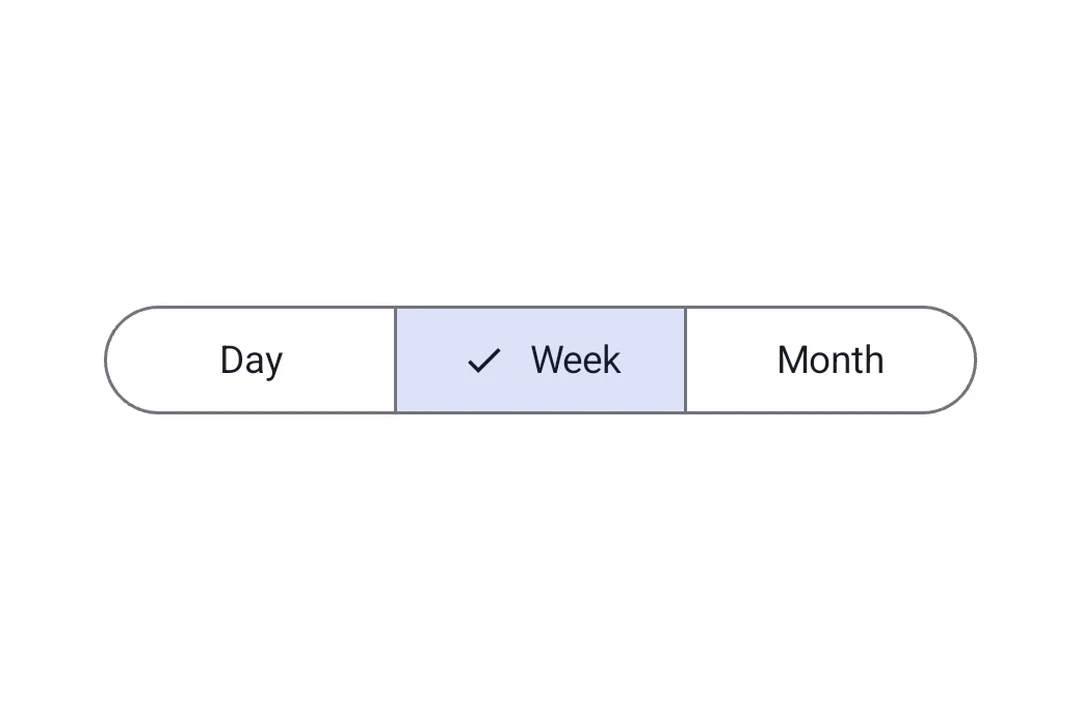
分段按钮让应用用户从一小组并排显示的选项中进行选择。它们对应官方的 Jetpack Compose Segmented Button API。
🌐 Segmented buttons let app users choose from a small set of options displayed side by side in a row. They map to the official Jetpack Compose Segmented Button API.
有两种容器类型:
🌐 There are two container types:
SingleChoiceSegmentedButtonRow: 一次只能选择一个按钮(类似单选按钮)。MultiChoiceSegmentedButtonRow:多个按钮可以独立切换(像复选框一样)。
安装
🌐 Installation
- npx expo install @expo/uiIf you are installing this in an existing React Native app, make sure to install expo in your project.
用法
🌐 Usage
单选分段按钮
🌐 Single-choice segmented button
当一次只能激活一个选项时使用 SingleChoiceSegmentedButtonRow。每个 SegmentedButton 都接受 selected 和 onClick 属性。
🌐 Use SingleChoiceSegmentedButtonRow when only one option can be active at a time. Each SegmentedButton takes selected and onClick props.
import { useState } from 'react';
import {
  Host,
  SingleChoiceSegmentedButtonRow,
  SegmentedButton,
  Text,
} from '@expo/ui/jetpack-compose';

export default function SingleChoiceExample() {
  const [selectedIndex, setSelectedIndex] = useState(0);
  const options = ['Day', 'Week', 'Month', 'Year'];

  return (
    <Host matchContents>
      <SingleChoiceSegmentedButtonRow>
        {options.map((label, index) => (
          <SegmentedButton
            key={label}
            selected={index === selectedIndex}
            onClick={() => setSelectedIndex(index)}>
            <SegmentedButton.Label>
              <Text>{label}</Text>
            </SegmentedButton.Label>
          </SegmentedButton>
        ))}
      </SingleChoiceSegmentedButtonRow>
    </Host>
  );
}
多选分段按钮
🌐 Multi-choice segmented button
当多个选项可以独立切换时使用 MultiChoiceSegmentedButtonRow。每个 SegmentedButton 接收 checked 和 onCheckedChange 属性。
🌐 Use MultiChoiceSegmentedButtonRow when multiple options can be toggled independently. Each SegmentedButton takes checked and onCheckedChange props.
import { useState } from 'react';
import {
  Host,
  MultiChoiceSegmentedButtonRow,
  SegmentedButton,
  Text,
} from '@expo/ui/jetpack-compose';

export default function MultiChoiceExample() {
  const [checkedItems, setCheckedItems] = useState([false, false, false, false]);
  const options = ['Wi-Fi', 'Bluetooth', 'NFC', 'GPS'];

  return (
    <Host matchContents>
      <MultiChoiceSegmentedButtonRow>
        {options.map((label, index) => (
          <SegmentedButton
            key={label}
            checked={checkedItems[index]}
            onCheckedChange={checked => {
              setCheckedItems(prev => {
                const next = [...prev];
                next[index] = checked;
                return next;
              });
            }}>
            <SegmentedButton.Label>
              <Text>{label}</Text>
            </SegmentedButton.Label>
          </SegmentedButton>
        ))}
      </MultiChoiceSegmentedButtonRow>
    </Host>
  );
}
自定义颜色
🌐 Custom colors
在 SegmentedButton 上使用 colors 属性来自定义其在激活、未激活和禁用状态下的外观。
🌐 Use the colors prop on SegmentedButton to customize its appearance across active, inactive, and disabled states.
import { useState } from 'react';
import {
  Host,
  SingleChoiceSegmentedButtonRow,
  SegmentedButton,
  Text,
} from '@expo/ui/jetpack-compose';

export default function CustomColorsExample() {
  const [selectedIndex, setSelectedIndex] = useState(0);
  const options = ['$', '$$', '$$$', '$$$$'];

  return (
    <Host matchContents>
      <SingleChoiceSegmentedButtonRow>
        {options.map((label, index) => (
          <SegmentedButton
            key={label}
            selected={index === selectedIndex}
            onClick={() => setSelectedIndex(index)}
            colors={{
              activeContainerColor: '#6200EE',
              activeContentColor: '#FFFFFF',
            }}>
            <SegmentedButton.Label>
              <Text>{label}</Text>
            </SegmentedButton.Label>
          </SegmentedButton>
        ))}
      </SingleChoiceSegmentedButtonRow>
    </Host>
  );
}
应用接口
🌐 API
import {
  SingleChoiceSegmentedButtonRow,
  MultiChoiceSegmentedButtonRow,
  SegmentedButton,
} from '@expo/ui/jetpack-compose';
Components
Type: React.Element<MultiChoiceSegmentedButtonRowProps>
A row container for multi-choice SegmentedButton children.
Maps to Material 3 MultiChoiceSegmentedButtonRow.
Type: React.Element<SegmentedButtonProps>
A Material 3 segmented button. Must be used inside a SingleChoiceSegmentedButtonRow
or MultiChoiceSegmentedButtonRow.
booleanWhether the button is currently checked (used inside MultiChoiceSegmentedButtonRow).
(checked: boolean) => voidCallback that is called when the checked state changes (used inside MultiChoiceSegmentedButtonRow).
() => voidCallback that is called when the button is clicked (used inside SingleChoiceSegmentedButtonRow).
Type: React.Element<SingleChoiceSegmentedButtonRowProps>
A row container for single-choice SegmentedButton children.
Maps to Material 3 SingleChoiceSegmentedButtonRow.
Types
Colors for the segmented button in different states.
| Property | Type | Description |
|---|---|---|
| activeBorderColor(optional) | ColorValue | - |
| activeContainerColor(optional) | ColorValue | - |
| activeContentColor(optional) | ColorValue | - |
| disabledActiveBorderColor(optional) | ColorValue | - |
| disabledActiveContainerColor(optional) | ColorValue | - |
| disabledActiveContentColor(optional) | ColorValue | - |
| disabledInactiveBorderColor(optional) | ColorValue | - |
| disabledInactiveContainerColor(optional) | ColorValue | - |
| disabledInactiveContentColor(optional) | ColorValue | - |
| inactiveBorderColor(optional) | ColorValue | - |
| inactiveContainerColor(optional) | ColorValue | - |
| inactiveContentColor(optional) | ColorValue | - |