This documentation is available as Markdown for AI agents and LLMs. See the full Markdown index or append .md to any documentation URL.
警报
用于呈现原生 iOS 警报对话框的 SwiftUI 警报组件。
Expo UI Alert 与官方 SwiftUI alert API 相匹配,并呈现带有标题、操作和可选消息的原生 iOS 警报对话框。
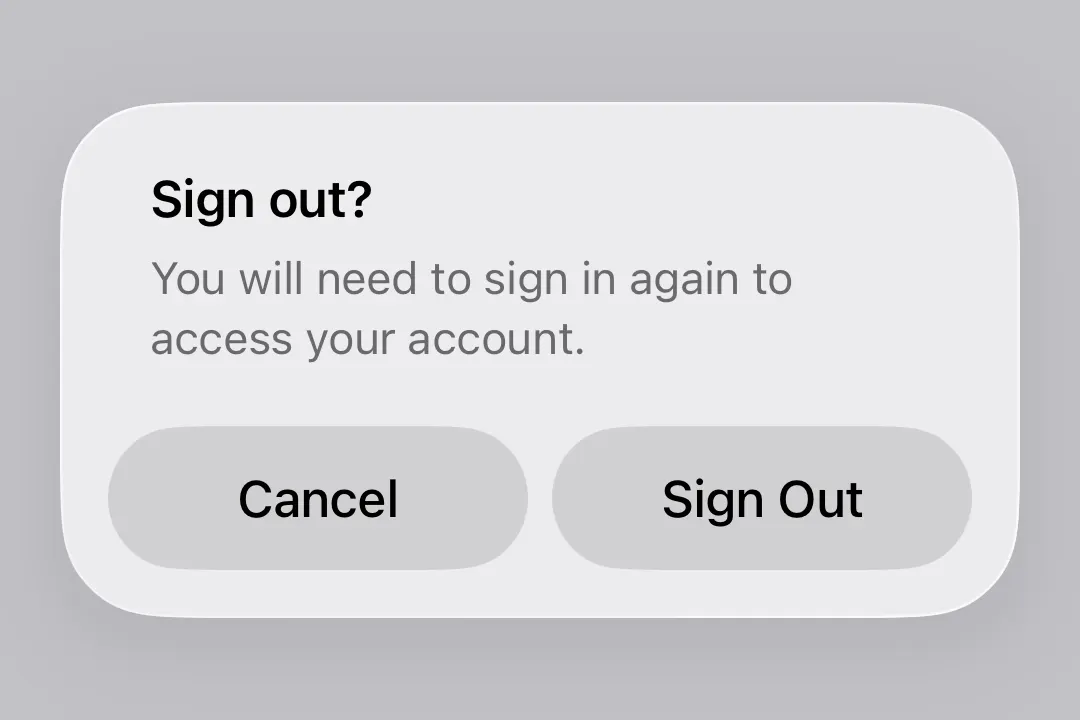
Alert 是 ConfirmationDialog 的居中模态对应组件,后者会从屏幕底部呈现为操作表单。两者共享相同的触发器/操作/信息插槽模型,因此调用者可以通过更改组件名称在它们之间切换。
安装
🌐 Installation
- npx expo install @expo/uiIf you are installing this in an existing React Native app, make sure to install expo in your project.
用法
🌐 Usage
基本警报
🌐 Basic alert
使用 Alert.Trigger 来定义可见元素,使用 Alert.Actions 来提供对话框按钮。
🌐 Use Alert.Trigger to define the visible element and Alert.Actions to provide the dialog buttons.
import { useState } from 'react';
import { Host, Alert, Button } from '@expo/ui/swift-ui';

export default function BasicAlertExample() {
  const [isPresented, setIsPresented] = useState(false);

  return (
    <Host matchContents>
      <Alert title="已保存" isPresented={isPresented} onIsPresentedChange={setIsPresented}>
        <Alert.Trigger>
          <Button label="Show alert" onPress={() => setIsPresented(true)} />
        </Alert.Trigger>
        <Alert.Actions>
          <Button label="OK" onPress={() => setIsPresented(false)} />
        </Alert.Actions>
      </Alert>
    </Host>
  );
}
取消并确认
🌐 Cancel and confirm
将 role="cancel" 与确认按钮结合以构建标准的是/否警告。
🌐 Combine role="cancel" with a confirm button to build a standard yes/no alert.
import { useState } from 'react';
import { Host, Alert, Button, Text } from '@expo/ui/swift-ui';

export default function CancelConfirmAlertExample() {
  const [isPresented, setIsPresented] = useState(false);

  return (
    <Host matchContents>
      <Alert title="注销吗?" isPresented={isPresented} onIsPresentedChange={setIsPresented}>
        <Alert.Trigger>
          <Button label="Sign out" onPress={() => setIsPresented(true)} />
        </Alert.Trigger>
        <Alert.Actions>
          <Button label="Sign Out" onPress={() => console.log('Signed out')} />
          <Button label="Cancel" role="cancel" />
        </Alert.Actions>
        <Alert.Message>
          <Text>You will need to sign in again to access your account.</Text>
        </Alert.Message>
      </Alert>
    </Host>
  );
}
破坏性行为
🌐 Destructive action
在 Alert.Actions 内的 Button 上使用 role="destructive" 来将其样式设置为破坏性操作。
🌐 Use role="destructive" on a Button inside Alert.Actions to style it as a destructive action.
import { useState } from 'react';
import { Host, Alert, Button, Text } from '@expo/ui/swift-ui';

export default function DestructiveAlertExample() {
  const [isPresented, setIsPresented] = useState(false);

  return (
    <Host matchContents>
      <Alert title="删除账户?" isPresented={isPresented} onIsPresentedChange={setIsPresented}>
        <Alert.Trigger>
          <Button label="Delete account" role="destructive" onPress={() => setIsPresented(true)} />
        </Alert.Trigger>
        <Alert.Actions>
          <Button
            label="Delete"
            role="destructive"
            onPress={() => {
              console.log('Deleted');
              setIsPresented(false);
            }}
          />
          <Button label="Cancel" role="cancel" />
        </Alert.Actions>
        <Alert.Message>
          <Text>This permanently deletes your account and all data. This cannot be undone.</Text>
        </Alert.Message>
      </Alert>
    </Host>
  );
}
应用接口
🌐 API
import { Alert } from '@expo/ui/swift-ui';
Component
Type: React.Element<AlertProps>
Alert presents a SwiftUI alert with a title, optional message, and action buttons.
See: Official SwiftUI documentation.