This documentation is available as Markdown for AI agents and LLMs. See the full Markdown index or append .md to any documentation URL.
DisclosureGroup
一个用于显示可展开内容的 SwiftUI DisclosureGroup 组件。
Expo UI DisclosureGroup 与官方的 SwiftUI DisclosureGroup API 相匹配,并显示一个可展开或隐藏内容的指示器。
🌐 Expo UI DisclosureGroup matches the official SwiftUI DisclosureGroup API and displays a disclosure indicator that reveals or hides content.
安装
🌐 Installation
- npx expo install @expo/uiIf you are installing this in an existing React Native app, make sure to install expo in your project.
用法
🌐 Usage
基本披露组
🌐 Basic disclosure group
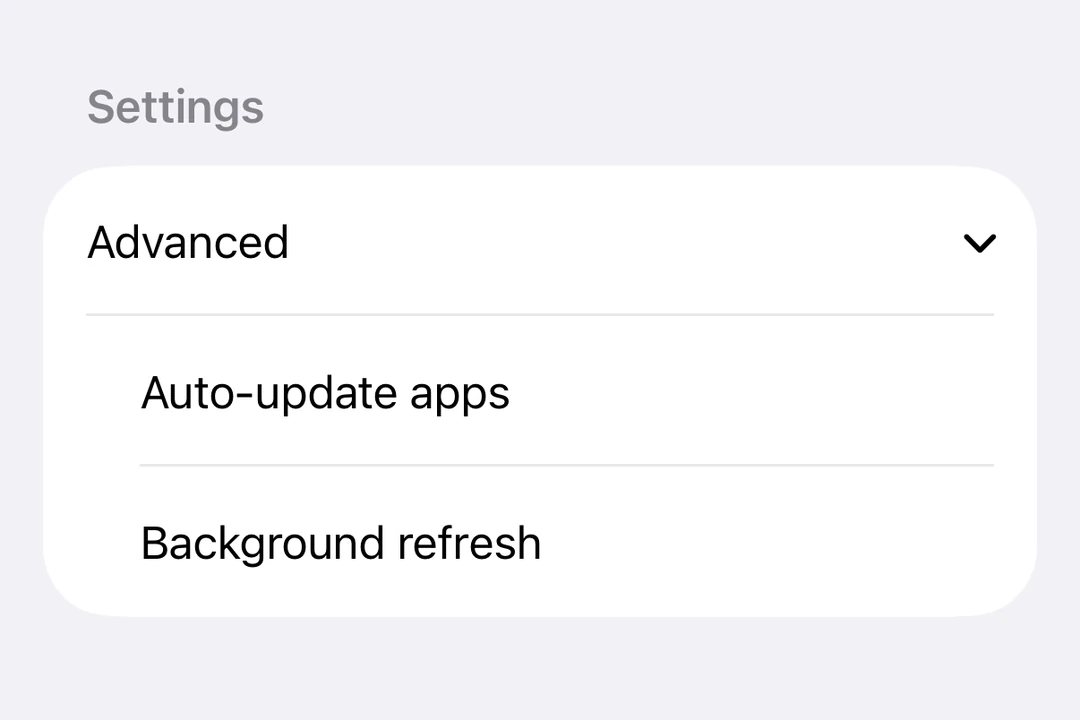
DisclosureGroup最常在Form内部使用,所以它会采用带有箭头指示器的标准iOS列表样式。
import { useState } from 'react';
import { DisclosureGroup, Form, Host, Section, Text } from '@expo/ui/swift-ui';

export default function BasicDisclosureGroupExample() {
  const [isExpanded, setIsExpanded] = useState(true);
  return (
    <Host style={{ flex: 1 }}>
      <Form>
        <Section>
          <DisclosureGroup
            label="Advanced settings"
            isExpanded={isExpanded}
            onIsExpandedChange={setIsExpanded}>
            <Text>Auto-update apps</Text>
            <Text>App downloads</Text>
            <Text>Offload unused apps</Text>
          </DisclosureGroup>
        </Section>
      </Form>
    </Host>
  );
}
最初扩展
🌐 Initially expanded
最初将 isExpanded 设置为 true,以默认显示内容。
🌐 Set isExpanded to true initially to show the content by default.
import { useState } from 'react';
import { Host, DisclosureGroup, Text } from '@expo/ui/swift-ui';

export default function InitiallyExpandedExample() {
  const [isExpanded, setIsExpanded] = useState(true);

  return (
    <Host matchContents>
      <DisclosureGroup label="Details" isExpanded={isExpanded} onIsExpandedChange={setIsExpanded}>
        <Text>This content is visible by default.</Text>
      </DisclosureGroup>
    </Host>
  );
}
自定义标签
🌐 Custom label
当标签需要自定义 SwiftUI 内容或修饰符而不是 label 字符串属性时,使用 DisclosureGroup.Label。
🌐 Use DisclosureGroup.Label when the label needs custom SwiftUI content or modifiers instead of the label string prop.
import { useState } from 'react';
import { DisclosureGroup, Form, Host, Section, Text } from '@expo/ui/swift-ui';
import { font, foregroundStyle } from '@expo/ui/swift-ui/modifiers';

export default function CustomLabelDisclosureGroupExample() {
  const [isExpanded, setIsExpanded] = useState(false);

  return (
    <Host style={{ flex: 1 }}>
      <Form>
        <Section>
          <DisclosureGroup isExpanded={isExpanded} onIsExpandedChange={setIsExpanded}>
            <DisclosureGroup.Label>
              <Text modifiers={[font({ weight: 'semibold' }), foregroundStyle('#0a7ea4')]}>
                Network options
              </Text>
            </DisclosureGroup.Label>
            <Text>Wi-Fi</Text>
            <Text>Bluetooth</Text>
            <Text>Cellular data</Text>
          </DisclosureGroup>
        </Section>
      </Form>
    </Host>
  );
}
应用接口
🌐 API
import { DisclosureGroup } from '@expo/ui/swift-ui';
Component
Type: React.Element<DisclosureGroupProps>
ReactNodestringText label for the disclosure group. Use DisclosureGroup.Label for custom label content.
(isExpanded: boolean) => voidA callback that is called when the expansion state changes.