This documentation is available as Markdown for AI agents and LLMs. See the full Markdown index or append .md to any documentation URL.
列表
一个用于显示可滚动项目列表的 SwiftUI 列表组件。
信息 有关跨平台使用,请参阅通用
List—— 它会根据平台呈现相应的原生组件。
Expo UI 列表与官方 SwiftUI List API 匹配,并支持通过 listStyle 修饰符进行样式设置,以及各种行/节修饰符,还支持选择、重新排序和编辑功能。
🌐 Expo UI List matches the official SwiftUI List API and supports styling via the listStyle modifier, various row/section modifiers, as well as selection, reordering, and editing capabilities.
安装
🌐 Installation
- npx expo install @expo/uiIf you are installing this in an existing React Native app, make sure to install expo in your project.
用法
🌐 Usage
基础列表
🌐 Basic list
import { Host, List, Text, Section } from '@expo/ui/swift-ui';

export default function BasicListExample() {
  return (
    <Host style={{ flex: 1 }}>
      <List>
        <Section title="水果">
          <Text>Apple</Text>
          <Text>Banana</Text>
          <Text>Orange</Text>
        </Section>
        <Section title="蔬菜">
          <Text>Carrot</Text>
          <Text>Broccoli</Text>
          <Text>Spinach</Text>
        </Section>
      </List>
    </Host>
  );
}
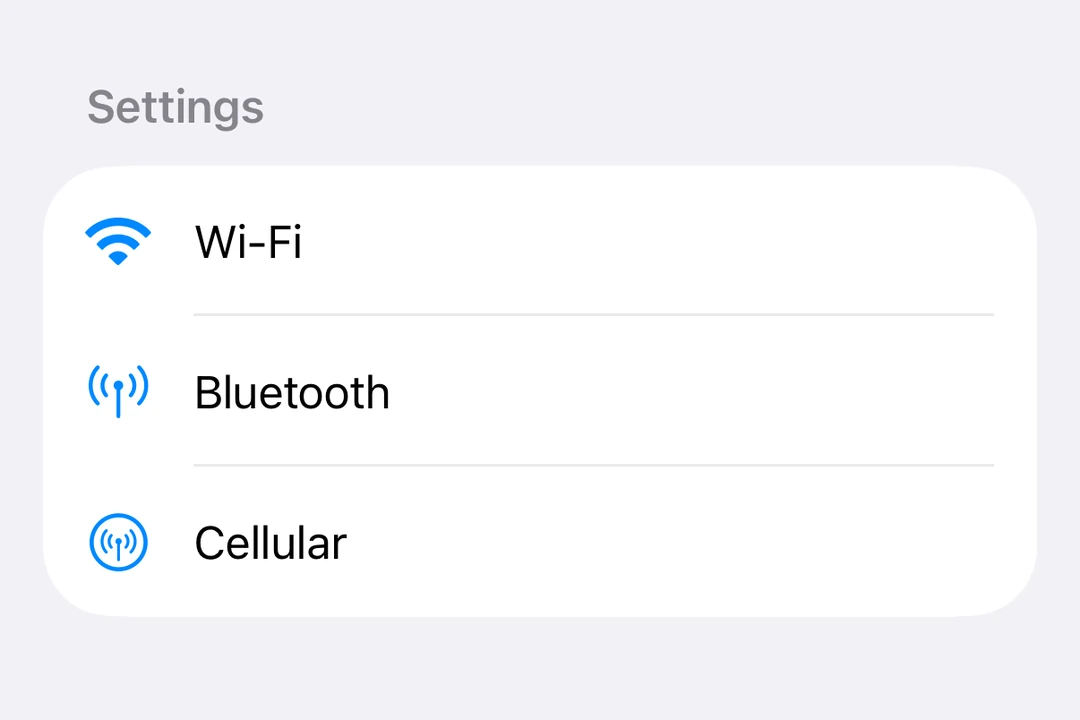
带标签和图标的列表
🌐 List with labels and icons
import { Host, List, Label, Section } from '@expo/ui/swift-ui';

export default function ListWithLabelsExample() {
  return (
    <Host style={{ flex: 1 }}>
      <List>
        <Section title="设置">
          <Label title="无线网络" systemImage="wifi" />
          <Label title="蓝牙" systemImage="antenna.radiowaves.left.and.right" />
          <Label title="蜂窝网络" systemImage="antenna.radiowaves.left.and.right.circle" />
        </Section>
      </List>
    </Host>
  );
}
列表样式
🌐 List styles
使用 listStyle 修饰符来更改列表的显示方式。
🌐 Use the listStyle modifier to change the list's appearance.
注意:
inset、insetGrouped和sidebar样式在 tvOS 上不可用。
import { useState } from 'react';
import { Host, List, Text, Section, Picker } from '@expo/ui/swift-ui';
import { listStyle, pickerStyle, tag } from '@expo/ui/swift-ui/modifiers';

const styles = ['automatic', 'plain', 'inset', 'insetGrouped', 'grouped', 'sidebar'] as const;

export default function ListStylesExample() {
  const [styleIndex, setStyleIndex] = useState(0);

  return (
    <Host style={{ flex: 1 }}>
      <List modifiers={[listStyle(styles[styleIndex])]}>
        <Section title="样式选择器">
          <Picker
            label="List Style"
            selection={styleIndex}
            onSelectionChange={setStyleIndex}
            modifiers={[pickerStyle('menu')]}>
            {styles.map((style, index) => (
              <Text key={style} modifiers={[tag(index)]}>
                {style}
              </Text>
            ))}
          </Picker>
        </Section>
        <Section title="样品项目">
          <Text>Item 1</Text>
          <Text>Item 2</Text>
          <Text>Item 3</Text>
        </Section>
      </List>
    </Host>
  );
}
选择和编辑模式
🌐 Selection and edit mode
使用 List.ForEach 复合组件以及 onDelete 和 onMove 属性,启用列表项的选择、删除和重新排序功能。
🌐 Enable selection, deletion, and reordering of list items using the List.ForEach compound component with onDelete and onMove props.
- 使用
environment修饰符来启用编辑模式 - 使用
tag修饰符来识别项目 - 使用
selection属性来控制选中的项目 - 使用
moveDisabled和deleteDisabled修饰符来禁用单个项目上的这些操作
import { useState } from 'react';
import { Host, List, Label, Section, Button, Toggle } from '@expo/ui/swift-ui';
import { environment, tag } from '@expo/ui/swift-ui/modifiers';

type Task = { id: string; title: string };

const INITIAL_TASKS: Task[] = [
  { id: '1', title: 'Task 1' },
  { id: '2', title: 'Task 2' },
  { id: '3', title: 'Task 3' },
  { id: '4', title: 'Task 4' },
];

export default function EditableListExample() {
  const [tasks, setTasks] = useState<Task[]>(INITIAL_TASKS);
  const [selectedIds, setSelectedIds] = useState<string[]>([]);
  const [editMode, setEditMode] = useState(false);

  const handleDelete = (indices: number[]) => {
    setTasks(prev => prev.filter((_, i) => !indices.includes(i)));
  };

  const handleMove = (sourceIndices: number[], destination: number) => {
    setTasks(prev => {
      const newTasks = [...prev];
      const [removed] = newTasks.splice(sourceIndices[0], 1);
      const adjustedDest = sourceIndices[0] < destination ? destination - 1 : destination;
      newTasks.splice(adjustedDest, 0, removed);
      return newTasks;
    });
  };

  return (
    <Host style={{ flex: 1 }}>
      <List
        selection={selectedIds}
        onSelectionChange={ids => setSelectedIds(ids.map(String))}
        modifiers={[environment('editMode', editMode ? 'active' : 'inactive')]}>
        <Section title="设置">
          <Toggle label="Edit Mode" isOn={editMode} onIsOnChange={setEditMode} />
        </Section>
        <Section title="任务">
          <List.ForEach onDelete={handleDelete} onMove={handleMove}>
            {tasks.map(task => (
              <Label key={task.id} title={task.title} modifiers={[tag(task.id)]} />
            ))}
          </List.ForEach>
        </Section>
      </List>
    </Host>
  );
}
下拉刷新
🌐 Pull to refresh
使用 refreshable 修饰符来启用下拉刷新功能。
🌐 Use the refreshable modifier to enable pull-to-refresh functionality.
import { useState } from 'react';
import { Host, List, Text, Section } from '@expo/ui/swift-ui';
import { refreshable } from '@expo/ui/swift-ui/modifiers';

export default function RefreshableListExample() {
  const [lastRefresh, setLastRefresh] = useState<Date | null>(null);

  const handleRefresh = async () => {
    // Simulate async data fetching
    await new Promise(resolve => setTimeout(resolve, 1500));
    setLastRefresh(new Date());
  };

  return (
    <Host style={{ flex: 1 }}>
      <List modifiers={[refreshable(handleRefresh)]}>
        <Section title="数据">
          <Text>Pull down to refresh</Text>
          {lastRefresh && <Text>Last refresh: {lastRefresh.toLocaleTimeString()}</Text>}
        </Section>
      </List>
    </Host>
  );
}
行样式
🌐 Row styling
使用listRowBackground、listRowSeparator和listRowInsets修饰符来自定义单独的行。
🌐 Use listRowBackground, listRowSeparator, and listRowInsets modifiers to customize individual rows.
import { Host, List, Text, Section } from '@expo/ui/swift-ui';
import { listRowBackground, listRowSeparator, listRowInsets } from '@expo/ui/swift-ui/modifiers';

export default function RowStylingExample() {
  return (
    <Host style={{ flex: 1 }}>
      <List>
        <Section title="样式化行">
          <Text modifiers={[listRowBackground('blue')]}>Blue background</Text>
          <Text modifiers={[listRowSeparator('hidden')]}>Hidden separator</Text>
          <Text modifiers={[listRowInsets({ leading: 40 })]}>Extra leading inset</Text>
          <Text modifiers={[listRowInsets({ leading: 0, trailing: 0 })]}>No horizontal insets</Text>
        </Section>
      </List>
    </Host>
  );
}
键盘隐藏行为
🌐 Keyboard dismiss behavior
使用 scrollDismissesKeyboard 修饰符来控制滚动时键盘的收回方式。
🌐 Use the scrollDismissesKeyboard modifier to control how the keyboard is dismissed when scrolling.
import { Host, List, Section, TextField } from '@expo/ui/swift-ui';
import { scrollDismissesKeyboard } from '@expo/ui/swift-ui/modifiers';

export default function KeyboardDismissExample() {
  return (
    <Host style={{ flex: 1 }}>
      <List modifiers={[scrollDismissesKeyboard('interactively')]}>
        <Section title="表格">
          <TextField placeholder="Name" />
          <TextField placeholder="Email" />
          <TextField placeholder="Phone" />
        </Section>
      </List>
    </Host>
  );
}
标题突出
🌐 Header prominence
使用 headerProminence 修饰符来调整章节标题的视觉突出性。
🌐 Use the headerProminence modifier to adjust the visual prominence of section headers.
import { Host, List, Text, Section } from '@expo/ui/swift-ui';
import { headerProminence } from '@expo/ui/swift-ui/modifiers';

export default function HeaderProminenceExample() {
  return (
    <Host style={{ flex: 1 }}>
      <List modifiers={[headerProminence('increased')]}>
        <Section title="重要部分">
          <Text>This section has increased header prominence</Text>
        </Section>
        <Section title="另一部分">
          <Text>Headers are more prominent</Text>
        </Section>
      </List>
    </Host>
  );
}
应用接口
🌐 API
import { List } from '@expo/ui/swift-ui';
Components
Type: React.Element<ListProps>
A list component that renders its children using a native SwiftUI List.
Type: React.Element<ListForEachProps>
A compound component of List that enables item deletion and reordering.
This component must be used as a child of List (as List.ForEach).
(indices: number[]) => voidCallback triggered when items are deleted. Receives an array of indices that were deleted.
See: Official SwiftUI documentation.
(sourceIndices: number[], destination: number) => voidCallback triggered when items are moved. Receives the source indices and destination index.
See: Official SwiftUI documentation.