This documentation is available as Markdown for AI agents and LLMs. See the full Markdown index or append .md to any documentation URL.
文本
一个 SwiftUI 文本组件,用于显示带样式的文本,并支持嵌套文本。
信息 有关跨平台使用,请参阅通用
Text—— 它会根据平台呈现相应的原生组件。
Expo UI 文本与官方 SwiftUI Text API 相匹配。
🌐 Expo UI Text matches the official SwiftUI Text API.
安装
🌐 Installation
- npx expo install @expo/uiIf you are installing this in an existing React Native app, make sure to install expo in your project.
用法
🌐 Usage
基础文本
🌐 Basic text
import { Host, Text } from '@expo/ui/swift-ui';

export default function BasicTextExample() {
  return (
    <Host matchContents>
      <Text>Hello world</Text>
    </Host>
  );
}
带有修饰符的文本
🌐 Text with modifiers
使用修饰符来为整个文本设置样式。
🌐 Use modifiers to style the entire text.
import { Host, Text } from '@expo/ui/swift-ui';
import { font, foregroundStyle } from '@expo/ui/swift-ui/modifiers';

export default function StyledTextExample() {
  return (
    <Host matchContents>
      <Text modifiers={[font({ size: 24, weight: 'bold' }), foregroundStyle('blue')]}>
        Large Bold Blue Text
      </Text>
    </Host>
  );
}
嵌套文本(每段样式)
🌐 Nested text (per-segment styling)
嵌套 Text 组件以对单独的片段进行不同的样式设置。这对于内联格式很有用,例如句子中的加粗或彩色单词。
🌐 Nest Text components to style individual segments differently. This is useful for inline formatting, such as bold or colored words within a sentence.
注意: 嵌套文本使用 SwiftUI 的 Text 拼接,因此只有返回
Text的修饰符(例如带有颜色的bold、italic、font、foregroundColor和foregroundStyle)会应用于嵌套部分。
import { Host, Text } from '@expo/ui/swift-ui';
import { bold, italic, foregroundStyle } from '@expo/ui/swift-ui/modifiers';

export default function NestedTextExample() {
  return (
    <Host matchContents>
      <Text>
        Hello <Text modifiers={[bold(), foregroundStyle('red')]}>world</Text>!
      </Text>
    </Host>
  );
}
混合内联样式
🌐 Mixed inline styles
将多个样式段组合以实现丰富的文本格式
🌐 Combine multiple styled segments for rich text formatting.
import { Host, Text } from '@expo/ui/swift-ui';
import { bold, italic, foregroundStyle, font } from '@expo/ui/swift-ui/modifiers';

export default function MixedStylesExample() {
  return (
    <Host matchContents>
      <Text>
        This is <Text modifiers={[bold()]}>bold</Text>, <Text modifiers={[italic()]}>italic</Text>,
        and <Text modifiers={[foregroundStyle('orange')]}>colored</Text> text.
      </Text>
    </Host>
  );
}
字体粗细
🌐 Font weights
使用 font 修饰符来应用不同的字体粗细。
🌐 Use the font modifier to apply different font weights.
import { Host, Text, VStack } from '@expo/ui/swift-ui';
import { font } from '@expo/ui/swift-ui/modifiers';

export default function FontWeightsExample() {
  return (
    <Host matchContents>
      <VStack spacing={4}>
        <Text modifiers={[font({ weight: 'ultraLight' })]}>Ultra Light</Text>
        <Text modifiers={[font({ weight: 'light' })]}>Light</Text>
        <Text modifiers={[font({ weight: 'regular' })]}>Regular</Text>
        <Text modifiers={[font({ weight: 'medium' })]}>Medium</Text>
        <Text modifiers={[font({ weight: 'semibold' })]}>Semibold</Text>
        <Text modifiers={[font({ weight: 'bold' })]}>Bold</Text>
        <Text modifiers={[font({ weight: 'heavy' })]}>Heavy</Text>
        <Text modifiers={[font({ weight: 'black' })]}>Black</Text>
      </VStack>
    </Host>
  );
}
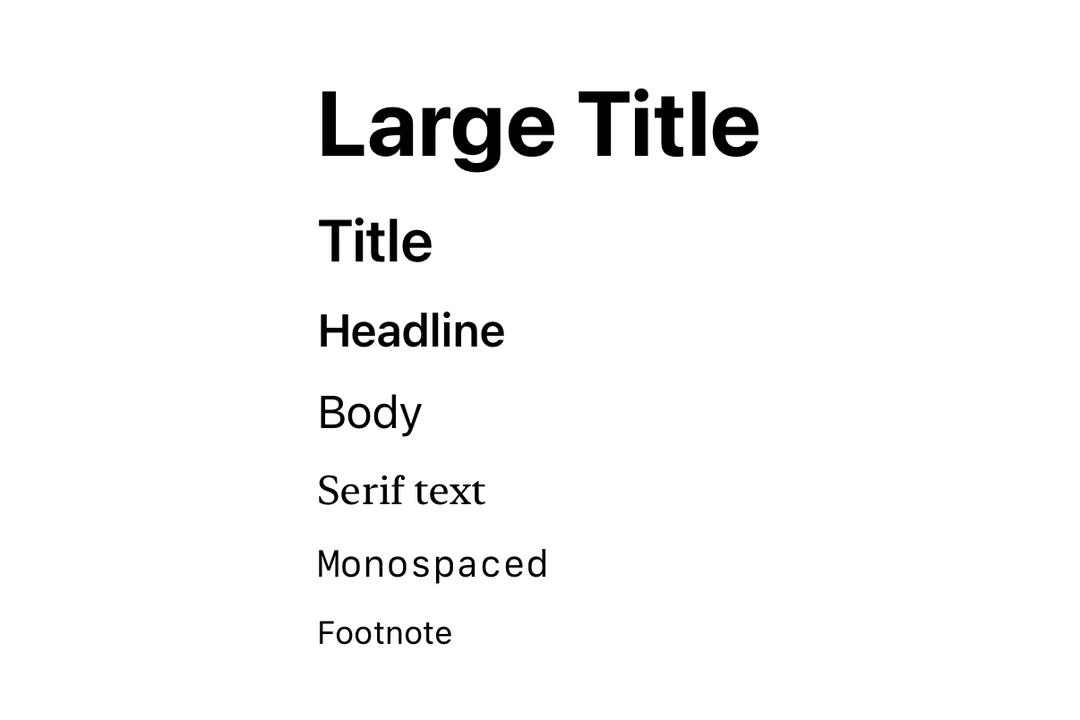
字体设计
🌐 Font designs
使用 font 修饰符来应用不同的字体设计。
🌐 Use the font modifier to apply different font designs.
import { Host, Text, VStack } from '@expo/ui/swift-ui';
import { font } from '@expo/ui/swift-ui/modifiers';

export default function FontDesignsExample() {
  return (
    <Host matchContents>
      <VStack spacing={4}>
        <Text modifiers={[font({ design: 'default', size: 18 })]}>Default Design</Text>
        <Text modifiers={[font({ design: 'rounded', size: 18 })]}>Rounded Design</Text>
        <Text modifiers={[font({ design: 'serif', size: 18 })]}>Serif Design</Text>
        <Text modifiers={[font({ design: 'monospaced', size: 18 })]}>Monospaced Design</Text>
      </VStack>
    </Host>
  );
}
自定义字体
🌐 Custom fonts
使用带有 family 参数的 font 修饰符来使用自定义字体。你可以使用 expo-font 库加载自定义字体。
🌐 Use the font modifier with a family parameter to use custom fonts. You can load custom fonts using expo-font library.
import { Host, Text, VStack } from '@expo/ui/swift-ui';
import { font } from '@expo/ui/swift-ui/modifiers';

export default function CustomFontExample() {
  return (
    <Host matchContents>
      <VStack spacing={4}>
        <Text modifiers={[font({ family: 'Inter-Bold', size: 18 })]}>Inter Bold</Text>
        <Text modifiers={[font({ family: 'Inter-Regular', size: 18 })]}>Inter Regular</Text>
      </VStack>
    </Host>
  );
}
有行数限制的文本
🌐 Text with line limit
使用 lineLimit 修饰符在达到一定行数后截断文本。
🌐 Use the lineLimit modifier to truncate text after a certain number of lines.
import { Host, Text } from '@expo/ui/swift-ui';
import { lineLimit } from '@expo/ui/swift-ui/modifiers';

export default function LineLimitExample() {
  const longText = 'This is a very long text that will be truncated after two lines. '.repeat(5);

  return (
    <Host matchContents>
      <Text modifiers={[lineLimit(2)]}>{longText}</Text>
    </Host>
  );
}
Markdown
使用 markdownEnabled 属性来启用文本内容的 Markdown 格式化。
🌐 Use the markdownEnabled property to enable Markdown formatting for the text content.
import { Host, Text, VStack } from '@expo/ui/swift-ui';

export default function MarkdownTextExample() {
  return (
    <Host matchContents>
      <VStack spacing={4}>
        <Text markdownEnabled>Regular text.</Text>
        <Text markdownEnabled>
          This is **bold text**, *italic text* and ***text in both bold and italic***.
        </Text>
        <Text markdownEnabled>~~Strikethrough text~~</Text>
        <Text markdownEnabled>`This is monospaced text`</Text>
        <Text markdownEnabled>
          Visit the [Expo Docs](https://expo.nodejs.cn/versions/latest/sdk/ui/) to learn more about
          Expo UI
        </Text>
      </VStack>
    </Host>
  );
}
自动更新日期
🌐 Auto-updating date
使用 date 和 dateStyle 属性来显示会随着时间推移自动更新的日期。这在小部件和实时活动中尤其有用。
🌐 Use the date and dateStyle props to display a date that automatically updates as time passes. This is especially useful in widgets and Live Activities.
import { Host, Text } from '@expo/ui/swift-ui';

export default function DateTextExample() {
  return (
    <Host matchContents>
      <Text date={new Date(Date.now() + 300000)} dateStyle="timer" />
    </Host>
  );
}
定时器间隔
🌐 Timer interval
使用 timerInterval 显示实时倒计时或计时器。这需要 iOS/tvOS 16 及以上版本。
🌐 Use timerInterval to display a live countdown or count-up timer. This requires iOS/tvOS 16+.
import { Host, Text } from '@expo/ui/swift-ui';

export default function TimerIntervalExample() {
  return (
    <Host matchContents>
      <Text
        timerInterval={{ lower: new Date(), upper: new Date(Date.now() + 600000) }}
        countsDown
      />
    </Host>
  );
}
注意:
timerInterval、countsDown和pauseTime需要 iOS 16.0+ / tvOS 16.0+。在旧版本中,计时器间隔将无法显示。
应用接口
🌐 API
import { Text } from '@expo/ui/swift-ui';
Component
Type: React.Element<TextProps>
boolean • Default: trueWhether the timer counts down (true) or up (false).
DateA date to display using the specified dateStyle. The text auto-updates as time passes.
booleanEnables Markdown formatting for the text content using SwiftUI LocalizedStringKey.
DateA date at which the timer should appear paused.
ClosedRangeDateA time interval to display as a live-updating timer.